
In private beta

Your own AI assistant, running on your Mac

Izuran Pro is a Mac app with a full AI assistant inside. It works in your files, apps and accounts, remembers what matters, and runs tasks on a schedule. Its models run on your Mac, where your conversations are kept.

Models on your Mac · Diagnostics you control · Signed with Developer ID and notarized by Apple · macOS 27 on Apple Silicon

Why Izuran Pro

An assistant that lives with you, not in someone’s cloud

Izuran Pro keeps the assistant, its memory and its models on a Mac you own. Beyond model downloads and its own updates, it reaches the internet only through the accounts and services you turn on.

Local by policy

Models run on this Mac, on another of your Macs joined to it by a Thunderbolt 5 cable, or on a model server on your own network; a model server outside it is refused. Nothing connects to an outside service by default: a server beyond your network is reached only if you added it yourself as a connector. Reading and searching the web are off until you turn them on, and a search, which goes to xAI with your own key, asks you first unless you have allowed it. There are no third-party analytics, and every command the assistant runs is told DO_NOT_TRACK. Izuran Pro’s own diagnostics, on in the private beta, are counts and crash reports without your content or any identifier, and one switch in Settings turns them off.
Asks before it acts

You choose how far it reaches: Read only, Project or Full. Its questions and approvals show in the conversation and as notifications with buttons on your Mac. A write outside the project, or anything near where your passwords and keys are kept needs Touch ID or your password. Ask it to change one of its own preferences or switches and it does, asking first before it turns on anything that lets it reach more; how far it may go, keys and sign-ins change only in Settings.

Yours to keep

What it remembers about you is a set of files on your Mac, one per fact, that Spotlight can find. Pin, edit or forget any of them in Settings.

Capabilities

What Izuran Pro does for you

A full assistant in a native Mac app: it plans, uses your apps and accounts, keeps a memory, and works on a schedule. It shows every step, and asks you before it sends or deletes mail, deletes an event, or writes outside its project.

Real work, shown step by step

Conversations and projects tied to folders on your Mac. Watch each step as it happens, review a plan before it runs, see every changed file as a diff, and restore any turn’s changes. Files, documents, pages and changes open in a side panel.

  • Projects
  • Plans
  • Diffs
  • Restore

Your Mac as its toolbox

Calendars, reminders, contacts, notes, photos and Mail, where sending and deleting always ask; your Shortcuts; Spotlight; Apple Weather, Maps and Music. It can operate apps on the Mac for you, and takes skills and MCP servers of your own.

  • Mail
  • Calendar
  • Shortcuts
  • MCP

Memory, and a second brain in testing

Facts it keeps about you, one file each, with only the pinned ones in every conversation. In testing: a second brain for the thoughts, projects and files you hand it, sorted every night, and an optional timeline of which app and window were in front, never their contents.

  • Memory
  • Brain
  • Timeline

The Bot

One assistant that stays: a thread on your Mac with a face and a name, its routines, and what it did while you were away. It keeps working with the window closed, and goes over the day’s conversations every night.

  • Always on
  • Routines
  • Nightly review

Automation tasks

Ask for something every morning, every Friday, or once next week. Tasks run on schedule while the window is closed and report back into the conversation that made them.

  • Schedules
  • Background work

Apps and services you choose

Izuran’s own browser, in a window you can watch; reading web pages; and searching the web through xAI with your own key. Each is a switch in Settings, off until you turn it on.

  • Browser
  • Web

Watch it work

Izuran Pro, recorded as it runs

The demos we post on X. Each plays in X’s own player, which loads from X only when you press play on it.

Plays in X’s video player, which loads from X when you press play.

Six leases, one question

A project holds six sample lease PDFs on the Mac. Asked which leases end in 2027 and what notice each tenant owes, Izuran Pro opens and reads every one, step by step, answers with a table of the three that end in 2027, and flags a notice due the next week.

0:59, no sound. Recorded in real time in Izuran Pro on a MacBook Pro with M5 Max and 128 GB, with Qwen3.8 27B, November 2026. The leases are sample documents.

What the video says
  1. Six leases. One question.
  2. A project with six lease PDFs, on this Mac.
  3. Izuran opens and reads every lease.
  4. Meanwhile on the Mac: live speed, memory and temperature.
  5. Qwen 3.8 27B FP8 on a MacBook Pro, M5 Max, 128 GB.
  6. Six leases read, step by step.
  7. Three leases end in 2027.
  8. And it flags the notice due in a week.
Watch on X (opens x.com in a new tab)

Plays in X’s video player, which loads from X when you press play.

Why the Library is short

Every model in the Library is tested with Izuran’s own agent first, because an agent needs every step to work, not one good reply. Each comes from the publisher’s own release at a pinned commit. A copy you already have is checked and only what differs is fetched, and a model that isn’t in the Library won’t load, with Izuran saying why.

1:06, no sound. Recorded in Izuran Pro on a MacBook Pro with M5 Max, November 2026. One step is shortened and the chain of steps is an illustration, as the video marks.

What the video says
  1. Why so few models?
  2. A chat needs one good reply.
  3. An agent needs every step to work.
  4. One link breaks, and the rest stops.
  5. Every model is tested with Izuran’s own agent.
  6. Tested first. Then in the Library.
  7. The publisher’s own release, at a pinned commit.
  8. Have it already?
  9. Izuran checks your copy and fetches only what differs.
  10. Not in the Library? It won’t load, and Izuran tells you why. On screen, Izuran Pro says: “Izuran doesn’t run qwen2 models.”
  11. Smaller models join when they pass.
Watch on X (opens x.com in a new tab)

Plays in X’s video player, which loads from X when you press play.

A smaller model is coming

Izuran Pro is getting a smaller model: Inkling 2 Mini, Thinking Machines’ own release. The video picks the maker in the Library, opens Inkling 2 Mini and loads it into memory. It comes to the beta with the next published build.

0:30, no sound. Recorded in Izuran Pro on a MacBook Pro with M5 Max, November 2026, on a build not yet published. The load is shown in real time.

What the video says
  1. A smaller model for Izuran Pro.
  2. Izuran Pro’s Library, on a MacBook Pro.
  3. Pick the maker: Thinking Machines.
  4. Inkling 2 Mini, the maker’s own release.
  5. Load it into memory.
  6. Loaded. Benchmarks on MacBook Pro, Mac Studio and Mac mini to follow.
Watch on X (opens x.com in a new tab)

The engine

Open-weight models, on a Mac you own

Izuran Pro runs models in its own MLX engine on Apple Silicon: Izuran’s own server on AIC’s fork of mlx-lm, from a signed runtime that comes inside the app. Download a model from the Library, such as Qwen, GLM or DeepSeek, and the engine serves it on this Mac, with speeds as MLX itself measures them; the two largest, GLM-5.3 and DeepSeek V4.1 Flash, run split across two Macs joined by a Thunderbolt 5 cable. It runs only the models in its Library, each one tested in Izuran; other models cannot be added. You can also point it at a model server on your own network. Apple Intelligence answers setup questions before any model is loaded; once one is, Izuran answers them itself, from its own manual and this Mac’s status.

Where models run
This Mac, two Macs joined by a Thunderbolt 5 cable, or a model server on your network
A model server outside your network
Refused
Models the engine runs
The ones in its Library
Third-party analytics
None
Diagnostics
Counts and crash reports, without your content or an identifier. On in the private beta; one switch turns them off
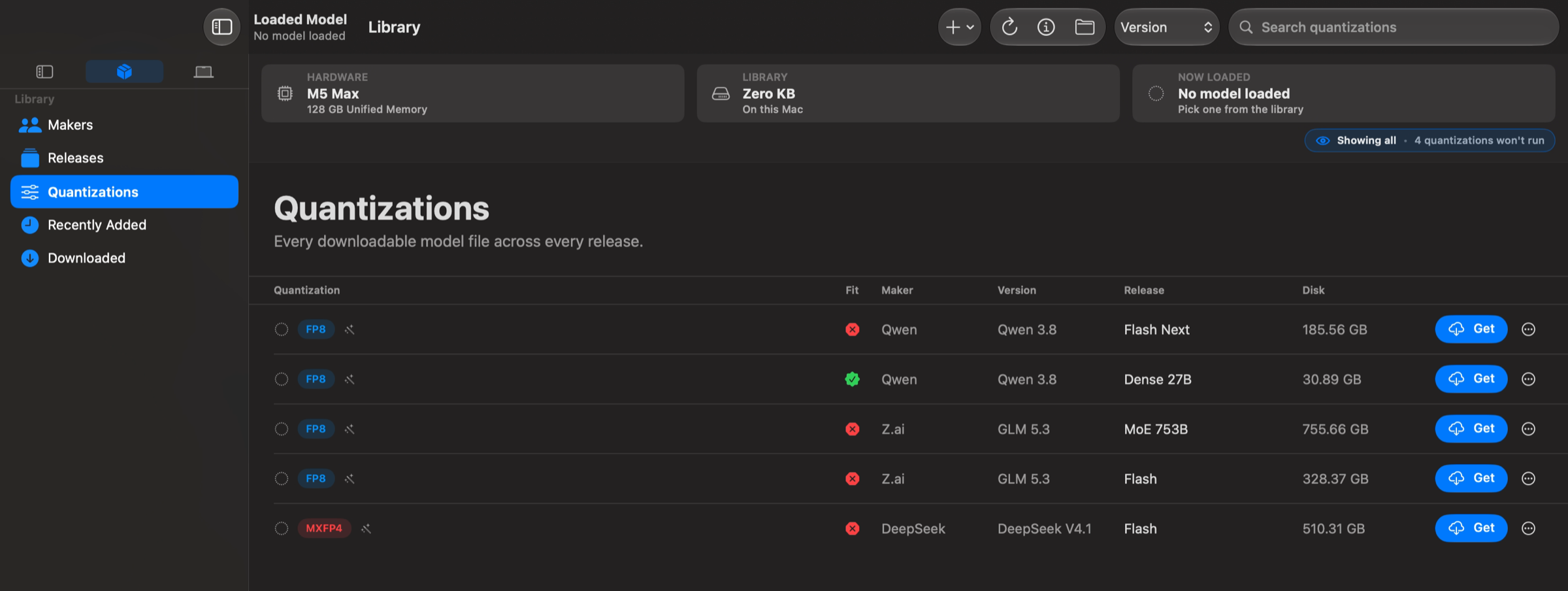
Izuran Pro's Library, on its Quantizations page: Qwen 3.8 Flash Next, 185.56 GB; Qwen 3.8 Dense 27B, 30.89 GB; GLM 5.3 MoE 753B, 755.66 GB; GLM 5.3 Flash, 328.37 GB; DeepSeek V4.1 Flash, 510.31 GB. Only Dense 27B is marked as fitting this Mac.
The Library in Izuran Pro: every model file it downloads, with its size and whether it fits this Mac, here a MacBook Pro with M5 Max and 128 GB. Recorded November 2026.

Getting started

Three steps and you are ready

Izuran Pro installs what it needs by itself. After that, it is a matter of what you let it reach and which model you want it to think with.

  1. Step 1

    Install

    Drag Izuran Pro from its disk image to Applications. Its engine comes inside, and updates download in the background.

  2. Step 2

    Grant access

    Settings ▸ Privacy ▸ Mac access lists every macOS permission with its state and next step, and can ask for them all at once.

  3. Step 3

    Pick a model

    Download one from the Library; the engine serves it on this Mac.

Engineered as a real local assistant

A native SwiftUI app with its own agent harness in Swift, and a Python MLX engine, signed and updated as one.

Get started

In private beta

Izuran Pro is in private beta, and downloads are by invitation: request one, and we'll email you a personal download link when there's a place for you. It's a disk image for Apple Silicon Macs, signed with Developer ID and notarized by Apple. It downloads signed updates in the background and applies one when you restart it, or by itself at an idle moment three days after it is ready, never while it is working.

Requesting an invite opens the Izuran Pro beta check on ambitioninnovationcreativity.com, the site of AIC, the company that makes Izuran. It asks for your Mac's chip and memory, to see whether it runs Izuran Pro, then a first name and email, kept under AIC's privacy policy. izuran.ai itself collects nothing.

Requirements: a Mac with Apple Silicon and macOS 27 or later. The two largest models need two such Macs joined by a Thunderbolt 5 cable. Which Mac runs which model (opens ambitioninnovationcreativity.com in a new tab)

Support: help with the beta, or write to contact@izuran.ai

For organizations

Izuran for an office or a team

AIC, the company behind Izuran, sets up private AI servers on Mac Studio and Mac mini that run Izuran Pro on your own network.

See AIC’s Private AI Server (opens ambitioninnovationcreativity.com in a new tab)

A capable assistant that stays yours

The privacy policy and terms of use say in full how the apps handle your data.